ummary: in this tutorial, you will learn how to use the PostgreSQL UPDATE statement to update existing data in a table.
PostgreSQL UPDATE syntax
To change the values of the columns in a table, you use the UPDATE statement. The following illustrates the syntax of the UPDATE statement:
1 2 3 4 5 | UPDATE table SET column1 = value1, column2 = value2 ,... WHERE condition; |
First, specify the table name where you want to update the data after UPDATE clause.
Second, list the columns whose values you want to change in the SET clause. If you update values in multiple columns, you use a comma (,) to separate each pair of column and value. The columns that are not in the list retain their original values.
Third, determine which rows you want to update in the condition of the WHERE clause. If you omit the WHERE clause, all rows in the table are updated.
PostgreSQL UPDATE examples
We will use the link table created in the PostgreSQL INSERT tutorial for the demonstration. Let’s examine the content of the linktable:
1 2 3 4 | SELECT * FROM link; |

PostgreSQL update table partially example
To change the NULL values of the last_updatecolumn to the current date, you use the following statement:
1 2 3 4 | UPDATE link SET last_update = DEFAULT WHERE last_update IS NULL; |
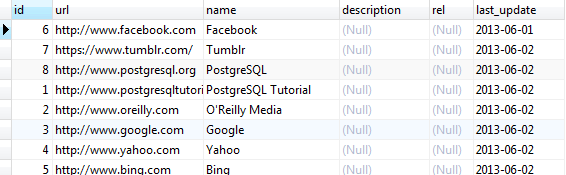
The WHEREclause filters rows whose values in the last_updatecolumn is not NULL. We used DEFAULT keyword because the last_updatecolumn accepts the current date as the default value.
PostgreSQL update all rows in a table
To update the values of the relcolumn to nofollowfor all rows in the linktable, you omit the WHERE clause in the UPDATE statement as follows:
1 2 | UPDATE link SET rel = 'nofollow'; |

You can also update data of a column from another column within the same table. The following statement copies the values of the namecolumn into the descriptioncolumn in the linktable:
1 2 | UPDATE link SET description = name; |

PostgreSQL update join example
Let’s examine the link_tmp table, which has the same structure as the link table:

The following statement updates values that come from the link table for the columns in the link_tmp table:
1 2 3 4 5 6 7 8 | UPDATE link_tmp SET rel = link.rel, description = link.description, last_update = link.last_update FROM link WHERE link_tmp.id = link.id; |

Notice that we used the FROM clause in the UPDATE statement to specify the second table ( link) that involves in the update.
This kind of UPDATEstatement sometimes referred to as UPDATE JOIN or UPDATE INNER JOIN because two or more tables are involved in the UPDATE statement. The join condition is specified in the WHERE clause.
PostgreSQL update with returning clause
The UPDATEstatement returns the number of affected rows by default. PostgreSQL also allows you to return updated entries using the RETURNINGclause in the UPDATEstatement. This addition is a PostgreSQL’s extension to SQL standard.
The following statement updates the row with id 1 in the linktable and returns the updated entries:
1 2 3 4 5 6 7 8 | UPDATE link SET description = 'Learn PostgreSQL fast and easy', rel = 'follow' WHERE ID = 1 RETURNING id, description, rel; |

To verify the update, we can select data from the linktable as the following query:
1 2 3 4 5 6 | SELECT * FROM link WHERE ID = 1; |

In this tutorial, you have learned how to update data from a table by using the PostgreSQL UPDATE statement.